TranscriptExporter Alternative for Fathom Bulk Exports
Export Fathom transcripts, summaries, action items, highlights, attendees and metadata in bulk without installing a Chrome extension.
TranscriptPort is a web-based alternative to TranscriptExporter for Fathom users who want Markdown, TXT, CSV or JSON exports delivered as organised files in one ZIP.
- 5 free exports
- Markdown/TXT/CSV/JSON
- OAuth connection
- $10 lifetime founding offer
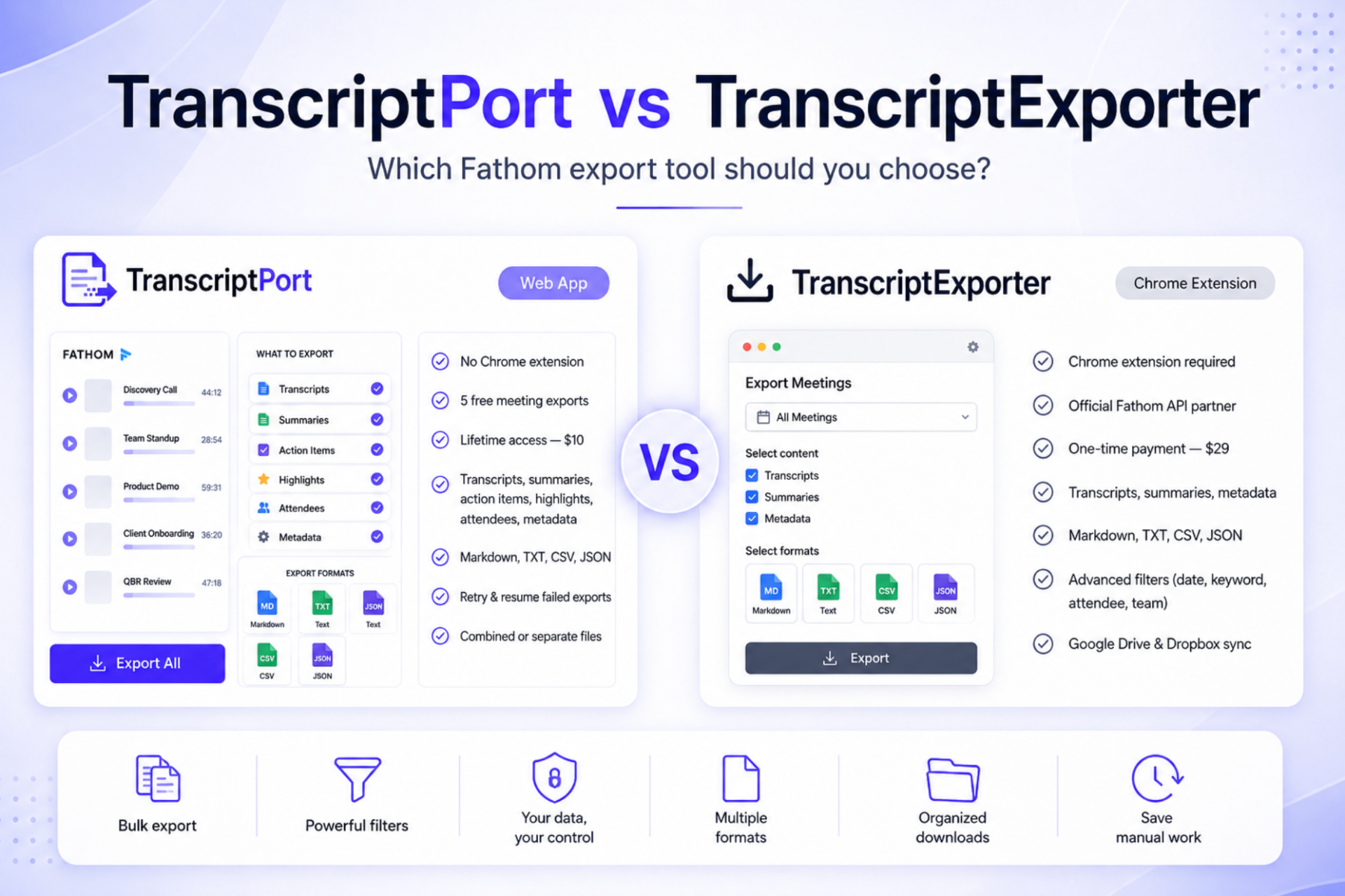
TranscriptPort is web-based. TranscriptExporter is a Chrome extension. Choose TranscriptPort if you want Fathom bulk exports without installing an extension.
TranscriptPort vs TranscriptExporter: quick answer
TranscriptPort is a web-based TranscriptExporter alternative for Fathom users. TranscriptExporter is a Chrome extension listed as a Fathom API Partner, while TranscriptPort works through a web app and Fathom OAuth without requiring a Chrome extension. TranscriptPort supports Markdown, TXT, CSV and JSON exports and can export transcripts, summaries, action items, highlights, attendees and meeting metadata. New users can export 5 meetings free, and the current founding lifetime offer is $10.
Looking for a TranscriptExporter alternative?
TranscriptExporter is a Chrome extension that helps Fathom users bulk export meeting transcripts. TranscriptPort solves the same core problem with a different approach: a web app where you connect Fathom through OAuth, select meetings and download structured files.
No extension requirement
Use a web app instead of installing another browser extension.
OAuth connection
Connect Fathom without sharing your Fathom password.
Clean ZIP downloads
Download organised files instead of manually saving calls one by one.
Free real exports
Try 5 real meeting exports before paying.
TranscriptPort vs TranscriptExporter
Both tools are useful. The right choice depends on whether you prefer a web-based workflow or a Chrome extension.
| Feature | TranscriptPort | TranscriptExporter |
|---|---|---|
| Product type | Web app | Chrome extension |
| Chrome extension required | No | Yes |
| Fathom connection | Fathom OAuth | Fathom OAuth / API partner workflow |
| Free real exports | 5 meeting exports | Requires paid license for full export workflow |
| Pricing | $10 lifetime founding offer | $29 one-time listed price |
| Transcript export | Yes | Yes |
| AI summary export | Yes | Yes |
| Action items | Yes | Check current export options |
| Highlights | Yes | Check current export options |
| Attendees | Yes | Used in filters and export workflows |
| Meeting metadata | Yes | Yes |
| Markdown export | Yes | Yes |
| TXT export | Yes | Yes |
| CSV export | Yes | Yes |
| JSON export | Yes | Yes |
| ZIP download | Yes | Yes |
| My Calls | Yes | Yes |
| Team Calls | Yes | Yes |
| Date filters | Yes | Yes |
| Keyword filters | Yes | Yes |
| Attendee filters | Yes | Yes |
| Google Drive / Dropbox sync | Not currently listed | Available as optional paid upgrade |
| Fireflies support | Planned later | Available today |
Choose a web app if you want
- No extension installation
- Account-based access from the browser
- A simpler setup flow
- Less dependency on Chrome
- Easier use across different devices
- A workflow that does not require browser extension permissions
Choose a Chrome extension if you want
- A workflow inside Chrome
- A browser-based extension interface
- The specific features offered by TranscriptExporter
- Existing Fireflies support
- Optional Google Drive or Dropbox sync
Export Fathom transcripts without a Chrome extension
If your main search is “Can I export Fathom transcripts without a Chrome extension?”, TranscriptPort is designed for that use case. Sign in, connect Fathom through OAuth, select meetings, choose a format and download your files.
- Step 1Sign in to TranscriptPort
- Step 2Connect Fathom through OAuth
- Step 3Select your meetings
- Step 4Choose your export format
- Step 5Download your ZIP
What can you export with TranscriptPort?
TranscriptPort is built to export more than just the raw transcript.
Transcripts
Full speaker-labelled conversation text for call reviews, AI analysis, research and archives.
AI summaries
Fathom-generated summaries for team handoffs, CRM notes and account summaries.
Action items
Tasks, commitments and follow-ups extracted from the meeting.
Highlights
Important moments or bookmarked parts of the meeting.
Attendees
Participant details for CRM matching, account organisation and reporting.
Meeting metadata
Meeting title, date, duration and structured fields for filtering and analysis.
Supported export formats
Markdown
Best for Notion, Obsidian, ChatGPT, Claude, NotebookLM and internal docs.
TXT
Best for plain-text archives, simple search, lightweight backups and maximum compatibility.
CSV
Best for Google Sheets, Excel, CRM cleanup, sales analysis and RevOps workflows.
JSON
Best for developers, APIs, internal tools, data pipelines and structured AI workflows.
When TranscriptPort is the better choice
- A web app instead of a Chrome extension
- A lower-cost lifetime offer
- 5 free exports before paying
- A simple OAuth connection
- Markdown, TXT, CSV and JSON
- Action items, highlights, attendees and metadata exports
- Organised ZIP downloads
- A product focused specifically on Fathom exports
When TranscriptExporter may be the better choice
- A Chrome extension workflow
- A tool listed in Fathom’s integration marketplace
- A product currently supporting Fireflies.ai
- Optional Google Drive or Dropbox syncing
- Multi-account export support through the extension
- An extension-based process you already understand
Use cases for a TranscriptExporter alternative
Sales teams
Analyse objections, competitor mentions, pricing questions, buying signals and follow-up commitments.
Customer success teams
Build customer-history archives, prepare handoffs, review renewal risks and identify onboarding friction.
Support teams
Review bug mentions, group feature requests, analyse complaints and prepare internal summaries.
Founders
Export user interviews, sales calls and research calls for voice-of-customer analysis.
Agencies and consultants
Organise client calls, create documentation, preserve context and build client knowledge bases.
Technical teams
Use CSV and JSON exports for CRM workflows, internal tools, APIs and AI pipelines.
TranscriptPort vs manual Fathom export
Manual export works for one or two calls. It becomes painful when you need dozens or hundreds.
TranscriptPort vs building with the Fathom API
A custom API workflow requires authentication, pagination, data mapping, error handling, format generation, ZIP packaging, retry logic and maintenance. TranscriptPort gives you the output without building the exporter yourself.
Independent comparison
TranscriptPort is not affiliated with TranscriptExporter. This page is an independent comparison for Fathom users evaluating transcript export tools. TranscriptExporter is a separate product owned and operated by its own team.
Final recommendation
If you want an established Chrome extension and current Fireflies support, TranscriptExporter is a valid option. If you want a web-based Fathom exporter with no Chrome extension, 5 free meeting exports, lower lifetime pricing and support for transcripts, summaries, action items, highlights, attendees and metadata, TranscriptPort is the better starting point.
No credit card required.
Frequently asked questions
- What is the best TranscriptExporter alternative?
- TranscriptPort is a web-based TranscriptExporter alternative for Fathom users. It lets you bulk export Fathom transcripts, summaries, action items, highlights, attendees and meeting metadata without installing a Chrome extension.
- Is TranscriptPort the same as TranscriptExporter?
- No. TranscriptPort and TranscriptExporter are separate products. TranscriptPort is a web app. TranscriptExporter is a Chrome extension.
- Does TranscriptPort require a Chrome extension?
- No. TranscriptPort works as a web app and connects to Fathom through OAuth.
- Does TranscriptExporter require a Chrome extension?
- Yes. TranscriptExporter’s public website and Chrome Web Store listing describe it as a Chrome extension for bulk exporting Fathom transcripts.
- Is TranscriptPort cheaper than TranscriptExporter?
- TranscriptPort currently offers a $10 lifetime founding offer. TranscriptExporter currently lists a $29 one-time payment. Pricing may change, so check both websites before purchasing.
- What formats does TranscriptPort support?
- TranscriptPort supports Markdown, TXT, CSV and JSON.
- Can I export Fathom transcripts without TranscriptExporter?
- Yes. You can copy individual transcripts manually from Fathom, build directly with the Fathom API or use a web-based exporter such as TranscriptPort.
- Why choose TranscriptPort over TranscriptExporter?
- Choose TranscriptPort if you want a web app, no Chrome extension, five free real meeting exports, lower lifetime pricing and export options for transcripts, summaries, action items, highlights, attendees and metadata.
- Why choose TranscriptExporter over TranscriptPort?
- Choose TranscriptExporter if you specifically want a Chrome extension, current Fireflies support, marketplace listing recognition or optional Google Drive and Dropbox syncing.